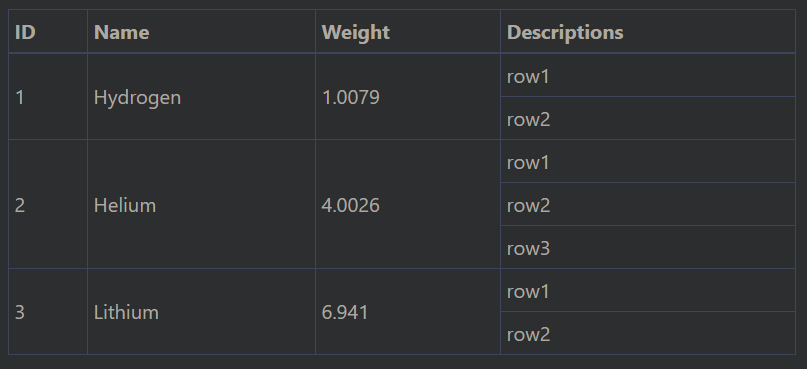
Angular Material Table rowspan columns based on dataSource object array property size
即使在Angular Material的7.2版中,我似乎也找不到关于如何在mat-table上使用rowpan并保持组件功能的示例。
这是多远(简短?):
上面Stackblitz中的示例几乎是我正在寻找的东西,但是我看不到如何完成它。
1 2 3 4 5 6 7 8 9 10 11 12 13 14 15 16 17 | ... =============================================== || || || || row1 || || 1 || Hydrogen || 1.0079 ||========|| || || || || row2 || =============================================== || || || || row1 || || || || ||========|| || 2 || Helium || 4.0026 || row2 || || || || ||========|| || || || || row3 || =============================================== || || || || row1 || || 3 || Lithium || 6.941 ||========|| || || || || row2 || =============================================== ... |
使用其他元数据格式的示例可以在以下位置找到:
在我的Stackblitz(第一个链接)之后,我的问题是:
我距离实现这种行间填充/ hack太远了吗?
如何根据row ['descriptions']大小的长度来循环行?
如果对象内部还有另一个数组属性怎么办? 我可以对其大小进行迭代并生成列/行/行跨度,这样它会变得更通用吗?
我正在尝试为社区找到通用的解决方案。
好吧,似乎材料表没有用于它的api文档,我也找不到做到这一点的任何技巧,但是我们可以选择我们的数据来支持这一点,根据您的第二个示例,我们可以将数据重新构建为新的json和我们可以获得预期的结果。
第1步 :
1 2 3 4 5 6 7 8 9 10 11 12 13 14 15 16 17 18 19 20 21 22 | const originalData = [ { id: 1, name: 'Hydrogen', weight: 1.0079, descriptions: ['row1', 'row2'] }, { id: 2, name: 'Helium', weight: 4.0026, descriptions: ['row1', 'row2', 'row3'] }, { id: 3, name: 'Lithium', weight: 6.941, descriptions: ['row1', 'row2'] }, { id: 4, name: 'Beryllium', weight: 9.0122, descriptions: ['row1', 'row2', 'row3'] }, { id: 5, name: 'Boron', weight: 10.811, descriptions: ['row1'] }, { id: 6, name: 'Carbon', weight: 12.0107, descriptions: ['row1', 'row2', 'row3'] }, { id: 7, name: 'Nitrogen', weight: 14.0067, descriptions: ['row1'] }, { id: 8, name: 'Oxygen', weight: 15.9994, descriptions: ['row1'] }, { id: 9, name: 'Fluorine', weight: 18.9984, descriptions: ['row1', 'row2', 'row3'] }, { id: 10, name: 'Neon', weight: 20.1797, descriptions: ['row1', 'row2', 'row3'] }, ]; //original data const DATA = originalData.reduce((current, next) => { next.descriptions.forEach(b => { current.push({ id: next.id, name: next.name, weight: next.weight, descriptions: b }) }); return current; }, []);//iterating over each one and adding as the description console.log(DATA) const ELEMENT_DATA: PeriodicElement[] = DATA; //adding data to the element data |
第2步
这将是您的第二个stackblitz链接。
1 2 3 | getRowSpan(col, index) { return this.spans[index] && this.spans[index][col]; } |
第三步
就像你第二个链接一样
1 2 3 4 5 6 7 8 9 10 11 12 13 14 15 16 17 18 19 20 21 22 23 24 25 26 27 28 29 30 31 32 33 34 35 36 | constructor() { this.cacheSpan('Priority', d => d.id); this.cacheSpan('Name', d => d.name); this.cacheSpan('Weight', d => d.weight); } /** * Evaluated and store an evaluation of the rowspan for each row. * The key determines the column it affects, and the accessor determines the * value that should be checked for spanning. */ cacheSpan(key, accessor) { for (let i = 0; i < DATA.length;) { let currentValue = accessor(DATA[i]); let count = 1; // Iterate through the remaining rows to see how many match // the current value as retrieved through the accessor. for (let j = i + 1; j < DATA.length; j++) { if (currentValue != accessor(DATA[j])) { break; } count++; } if (!this.spans[i]) { this.spans[i] = {}; } // Store the number of similar values that were found (the span) // and skip i to the next unique row. this.spans[i][key] = count; i += count; } } |
第4步
使用索引向下传递到rowpan并隐藏不需要的行
1 2 3 4 5 6 7 8 9 10 11 12 13 14 15 16 17 18 19 20 21 22 23 24 25 26 27 28 | <ng-container matColumnDef="id"> <th mat-header-cell *matHeaderCellDef> Priority </th> <td mat-cell *matCellDef="let data;let i = dataIndex" [attr.rowspan]="getRowSpan('Priority',i)" [style.display]="getRowSpan('Priority', i) ? '' : 'none'"> {{ data.id }} </td> </ng-container> <ng-container matColumnDef="name"> <th mat-header-cell *matHeaderCellDef> Name </th> <td mat-cell *matCellDef="let data;let i = dataIndex" [attr.rowspan]="getRowSpan('Name',i)" [style.display]="getRowSpan('Name', i) ? '' : 'none'"> {{ data.name }} </td> </ng-container> <ng-container matColumnDef="weight"> <th mat-header-cell *matHeaderCellDef> Weight </th> <td mat-cell *matCellDef="let data;let i = dataIndex" [attr.rowspan]="getRowSpan('Weight',i)" [style.display]="getRowSpan('Weight', i) ? '' : 'none'"> {{ data.weight }} </td> </ng-container> <ng-container matColumnDef="descriptions"> <th mat-header-cell *matHeaderCellDef> Descriptions </th> <td mat-cell *matCellDef="let data"> {{ data.descriptions }} </td> </ng-container> <tr mat-header-row *matHeaderRowDef="displayedColumns"></tr> <tr mat-row *matRowDef="let row; columns: displayedColumns;"></tr> </table> |
这是演示
由于我对给出的答案(尤其是
我想出了一些更方便的恕我直言,类似于:
1 2 3 4 5 6 7 8 9 10 11 12 13 14 15 16 17 18 19 20 21 22 23 24 25 26 27 28 29 30 31 32 33 34 35 36 | export class TableBasicExample { displayedColumns = ['priority', 'status', 'dateCreated', 'testNumber', 'testCurrency', 'testTime']; dataSource = DATA; spans = {}; constructor() { this.spans = Object.assign({}, { priority: this.spanDeep(['priority'], DATA), status: this.spanDeep(['priority', 'status'], DATA), dateCreated: this.spanDeep(['priority', 'status', 'dateCreated'], DATA) }); } spanDeep(paths: string[] | null, data: any[]) { if (!paths.length) { return [...data] .fill(0) .fill(data.length, 0, 1); } const copyPaths = [...paths]; const path = copyPaths.shift(); const uniq = uniqWith(data, (a, b) => get(a, path) === get(b, path)) .map(item => get(item, path)); return uniq .map(uniqItem => this.spanDeep(copyPaths, data.filter(item => uniqItem === get(item, path)))) .flat(paths.length); } getRowSpan(path, idx) { return this.spans[path][idx]; } }; |
可以在这里找到工作示例:https://stackblitz.com/edit/angular-lnahlh-hw2d3b
我们必须说那里有多少行,但是有些行具有相同的
但是对于您的数据,据说那里有一些行,并且描述可以数组和可拆分。通过这种方式,JS无法知道应该有多少
2种方法供您选择:
1-格式化数据,每行保留一个描述,与第二个href
2-更新内容格式,如描述
- ,并删除
[attr.rowspan] 属性。
有一些技巧可以使这项工作。其他答案已经解决了,但我将尝试其他方法。
假设您的数据如下(我从其他答案之一中得出):
1
2
3
4
5elements = [
{ id: 1, name: 'Hydrogen', weight: 1.0079, descriptions: ['row1', 'row2'] },
{ id: 2, name: 'Helium', weight: 4.0026, descriptions: ['row1', 'row2', 'row3'] },
{ id: 3, name: 'Lithium', weight: 6.941, descriptions: ['row1', 'row2'] }
]如果只显示其中一个元素,则应编写:
1
2
3
4
5
6
7
8
9
10
11
12
13
14
15
16
17
18
19
20
21<table>
<thead>
<tr>
<th>ID</th>
<th>Name</th>
<th>Weight</th>
<th>Descriptions</th>
</tr>
</thead>
<tbody>
<tr>
<td rowspan="2">1</td>
<td rowspan="2">Hidrogen</td>
<td rowspan="2">1.0079</td>
<td>row1</td>
</tr>
<tr>
<td>row2</td>
</tr>
</tbody>
</table这将使我们:

现在,如果要迭代数据,则需要更改某些内容。
绝招1
如果我们在
tr 标记内使用*ngFor ,则表将崩溃。相反,我们只需要在ng-container 标记内使用它。把戏2
我们必须将
rowspan 更改为[attr.rowspan] 。绝招3
这些行必须有一个单独的迭代器,但是我们已经有了第一个元素。因此,我们必须进行此分离的迭代(使用另一个
*ngFor ),但是如果索引大于0则仅显示它。1
2
3
4
5
6
7
8
9
10
11
12
13
14
15
16
17
18
19
20
21
22
23<table>
<thead>
<tr>
<th>ID</th>
<th>Name</th>
<th>Weight</th>
<th>Descriptions</th>
</tr>
</thead>
<tbody>
<ng-container *ngFor="let e of elements">
<tr>
<td [attr.rowspan]="e.descriptions.length + 1">{{e.id}}</td>
<td [attr.rowspan]="e.descriptions.length + 1">{{e.name}}</td>
<td [attr.rowspan]="e.descriptions.length + 1">{{e.weight}}</td>
<td>{{e.descriptions[0]}}</td>
</tr>
<tr *ngFor="let d of e.descriptions; let index = index">
<td *ngIf="index>0">{{d}}</td>
</tr>
</ng-container>
</tbody>
</table>最后,我们有: