“flask.cli.NoAppException” while running flask app
我是python开发的新手,对flask不了解,已为我分配了一个使用flask开发的项目。工作了几周后,我现在可以解决所有依赖关系,并且项目现在可以成功编译。但是,当我使用flask run运行项目,然后在浏览器中输入URL时,它会抛出" flask.cli.NoAppException "。我如何运行我尝试过的项目。
Flask运行
- 正在投放Flask应用" init.py "(延迟加载)
- 环境:开发
- 调试模式:打开
- 用统计重启
- 调试器处于活动状态!
- 调试器PIN:202-733-235
- 在http://127.0.0.1:5000/上运行(按CTRL C退出)
这是引用
1 2 3 4 5 6 7 8 9 10 11 12 13 14 15 16 17 18 19 20 21 | "FLASK_APP=myappnam:name to specify one. Traceback (most recent call last) File"C:\\Program Files\\Python38\\Lib\\site-packages\\flask\\_compat.py", line 39, in reraise raise value File"C:\\Program Files\\Python38\\Lib\\site-packages\\flask\\cli.py", line 97, in find_best_app raise NoAppException( flask.cli.NoAppException: Failed to find Flask application or factory in module"myappnam". Use"FLASK_APP=myappnam:name to specify one. The debugger caught an exception in your WSGI application. You can now look at the traceback which led to the error. To switch between the interactive traceback and the plaintext one, you can click on the"Traceback" headline. From the text traceback you can also create a paste of it. For code execution mouse-over the frame you want to debug and click on the console icon on the right side. You can execute arbitrary Python code in the stack frames and there are some extra helpers available for introspection: dump() shows all variables in the frame dump(obj) dumps all that's known about the object |
这是我的--init--.py文件
1 2 3 4 5 6 7 8 9 10 11 12 13 14 15 16 17 18 19 20 21 22 23 24 25 26 27 28 29 30 31 32 33 34 35 36 37 38 39 40 41 42 43 44 45 46 47 48 49 50 51 52 53 54 55 56 57 58 59 60 61 62 63 64 65 66 67 68 69 70 71 72 73 74 75 76 77 78 79 80 81 82 83 84 85 86 87 88 89 90 91 92 93 94 95 96 97 98 99 100 101 102 103 104 105 106 107 108 109 110 111 112 113 114 115 116 117 118 119 120 121 122 123 124 125 126 127 128 129 130 131 132 133 134 135 136 137 138 139 140 141 142 143 144 145 146 147 148 149 150 151 152 153 154 155 156 157 158 159 160 161 162 163 164 165 166 167 168 169 170 171 172 173 174 175 176 | import os import logging import gevent import datetime import rollbar from gevent.queue import Queue from gevent.event import AsyncResult import zmq.green as zmq from werkzeug.contrib.fixers import ProxyFix # Greens the postgress connector try: import psycogreen.gevent psycogreen.gevent.patch_psycopg() except ImportError: pass from rauth.service import OAuth2Service from flask import Flask, Request from flask_sqlalchemy import SQLAlchemy from flask_bcrypt import Bcrypt from flask_login import LoginManager, current_user from flask_assets import Environment from flask_uploads import UploadSet, configure_uploads, IMAGES from app.util import setup_logging from app.exceptions import TimeoutError, BackendError import app.exceptions flask_app = None # Have to use an actor pattern because we cannot allow more than one request to # be pending at a time. class Backend(gevent.Greenlet): def __init__(self): super(Backend, self).__init__() self.inbox = Queue() self.zmq_context = zmq.Context() self.zmq_socket = None self.init_socket() def init_socket(self): zmq_socket = self.zmq_socket if zmq_socket is not None: zmq_socket.close(0) zmq_socket = self.zmq_context.socket(zmq.REQ) zmq_socket.connect(flask_app.config["SERVER_ZMQ_URI"]) self.zmq_socket = zmq_socket def process(self, request): zmq_socket = self.zmq_socket poller = zmq.Poller() poller.register(zmq_socket, zmq.POLLIN) zmq_socket.send_json({ "command": request["command"], "arguments": request["arguments"] }) sockets = dict(poller.poll(10 * 1000)) if zmq_socket not in sockets: self.init_socket() result = request["result"] result.set_exception(TimeoutError("The request to the backend timed out.")) return received = zmq_socket.recv_json() result = request["result"] if received["success"]: result.set(received["result"]) else: result.set_exception(BackendError(received["result"])) def _run(self): while True: self.process(self.inbox.get()) def send(self, command, **kwargs): result = AsyncResult() self.inbox.put({ "command": command, "arguments": kwargs, "result": result }) return result.get() class RollbarRequest(Request): @property def rollbar_person(self): if current_user.is_anonymous: return { "id": 0, "username":"anonymous" } return { "id": current_user.id, "username": current_user.name, "email": current_user.email_address } def create_app(*args, **kwargs): global flask_app global l app_mode = os.environ.get("APP_MODE") assert app_mode is not None,"APP_MODE environment variable must be set" flask_app = Flask(__name__) flask_app.request_class = RollbarRequest flask_app.config.from_object("config.mode_{}".format(app_mode)) flask_app.config["APP_MODE"] = app_mode setup_logging(flask_app.config["LOGGING_LEVEL"]) l = logging.getLogger(__name__) l.info("starting in mode {}".format(app_mode)) if not flask_app.config["DEBUG"]: rollbar.init( flask_app.config["ROLLBAR_API_KEY"], app_mode, allow_logging_basic_config=False ) flask_app.jinja_env.globals.update( current_year=lambda: datetime.datetime.now().year ) # Have to do this so that redirects work in proxy mode behind NGINX. if not flask_app.debug: flask_app.wsgi_app = ProxyFix(flask_app.wsgi_app) flask_app.db = SQLAlchemy(flask_app) flask_app.bcrypt = Bcrypt(flask_app) flask_app.assets = Environment(flask_app) flask_app.images = UploadSet("images", IMAGES) configure_uploads(flask_app, flask_app.images) flask_app.photos = UploadSet("photos", IMAGES) configure_uploads(flask_app, flask_app.photos) login_manager = LoginManager() login_manager.login_view ="signin" login_manager.login_message_category ="alert" # Need newer release of Flask-Login for this to work. login_manager.init_app(flask_app) flask_app.facebook = OAuth2Service( name="facebook", base_url="https://graph.facebook.com/v2.8/", client_id=flask_app.config["FACEBOOK_CLIENT_ID"], client_secret=flask_app.config["FACEBOOK_CLIENT_SECRET"] ) from app import views from app import models from app import commands flask_app.backend = Backend() flask_app.backend.start() app.exceptions.register(flask_app) return flask_app |
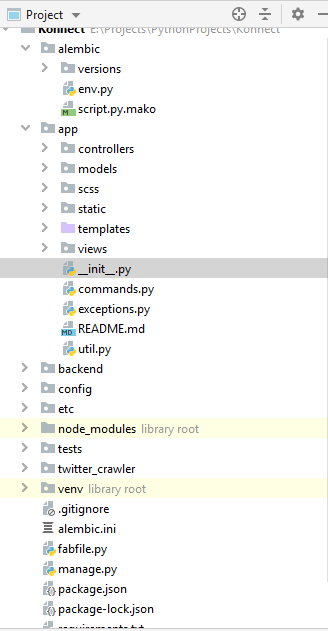
这是我的项目结构
1 2 3 4 5 6 | def create_app(): app = flask.Flask(__name__) # do some setup return app app = create_app() |
该应用程序实例也应称为