Why is alpha blending not working properly? [Pygame]
我正在尝试创建一个简单的Pyame应用程序,其中一些颜色与它们下面的颜色混合在一起。 这是我的代码:
代码清单1:
1 2 3 4 5 6 7 8 9 10 11 12 13 14 15 16 17 18 19 20 21 22 23 24 25 26 27 28 29 30 31 32 33 34 35 36 37 38 39 40 41 42 43 44 45 46 47 48 49 50 | import pygame, sys, time from pygame.locals import * #define constants WINDOW_WIDTH = 600 WINDOW_HEIGHT = 600 FPS = 60 pygame.init() clock = pygame.time.Clock() screen = pygame.display.set_mode((WINDOW_WIDTH, WINDOW_HEIGHT), 0, 32) alpha = 0 increasing = True while True: for event in pygame.event.get(): if event.type == QUIT: pygame.quit() sys.exit() #fill screen with red screen.fill(pygame.Color(247, 25, 0,255)) alpha_surface = pygame.Surface((screen.get_rect().width, screen.get_rect().height)) alpha_surface = alpha_surface.convert_alpha() surfaceRect = alpha_surface.get_rect() #fill surface with orange pygame.draw.rect(alpha_surface, (247, 137, 0, 255), (0, 0, 480, 480)) #fill surface with translucent yellow pygame.draw.rect(alpha_surface, (220, 247, 0, alpha), (120, 120, 360, 360)) #fill surface with green pygame.draw.rect(alpha_surface, (0, 247, 4), (240, 240, 240, 240)) #fill surface with translucent blue pygame.draw.rect(alpha_surface, (0, 78, 247, alpha), (360, 360, 120, 120)) screen.blit(alpha_surface, (120,120)) pygame.display.update() clock.tick(FPS) if increasing: alpha += 1 if alpha > 255: alpha = 255 increasing = False else: alpha -= 1 if alpha < 0: alpha = 0 increasing = True |
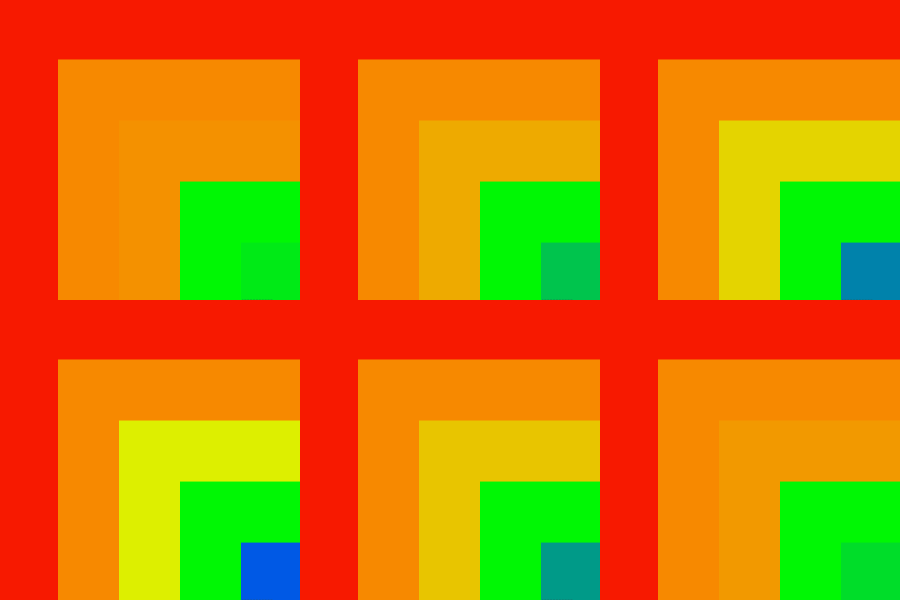
代码应该做到这一点,因此黄色矩形与橙色矩形融合在一起,蓝色矩形与绿色矩形融合在一起。 相反,我从中得到了一些好处:
图1:黄色和蓝色不透明度设置为0%的原始状态
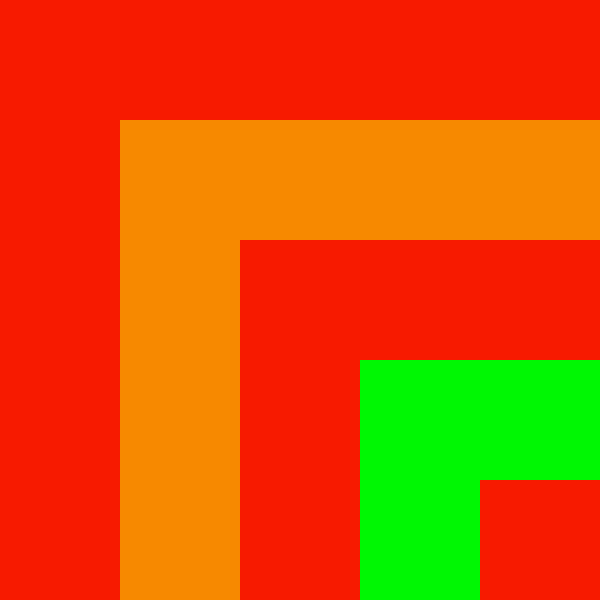
如果要混合不同的图层,则必须创建不同的
创建一个表面透明并使其完全透明。 此度量用
1 2 3 | alpha_surface1 = pygame.Surface( (screen.get_rect().width, screen.get_rect().height) ) alpha_surface1 = alpha_surface1.convert_alpha() alpha_surface1.fill( pygame.Color(0, 0, 0, 0) ) |
在所需的表面上绘制任何东西,例如 一个矩形
1 | pygame.draw.rect(alpha_surface1, (247, 137, 0, 255), (120, 120, 480, 480)) |
1 | screen.blit(alpha_surface1, (0,0)) |
在多个表面重复此操作:
例如
1 2 3 4 5 6 7 8 9 10 11 12 13 14 15 16 17 18 19 20 21 22 23 24 25 26 27 28 29 30 31 32 33 34 35 | #fill screen with red screen.fill(pygame.Color(247, 25, 0,255)) #fill surface with orange alpha_surface1 = pygame.Surface( (screen.get_rect().width, screen.get_rect().height) ) alpha_surface1 = alpha_surface1.convert_alpha() alpha_surface1.fill( pygame.Color(0, 0, 0, 0) ) pygame.draw.rect(alpha_surface1, (247, 137, 0, 255), (120, 120, 480, 480)) #fill surface 2 with translucent yellow alpha_surface2 = pygame.Surface( (screen.get_rect().width, screen.get_rect().height) ) alpha_surface2 = alpha_surface2.convert_alpha() alpha_surface2.fill( pygame.Color(0, 0, 0, 0) ) pygame.draw.rect(alpha_surface2, (220, 247, 0, alpha), (240, 240, 360, 360)) #fill surface 3 with green alpha_surface3 = pygame.Surface( (screen.get_rect().width, screen.get_rect().height) ) alpha_surface3 = alpha_surface3.convert_alpha() alpha_surface3.fill( pygame.Color(0, 0, 0, 0) ) pygame.draw.rect(alpha_surface3, (0, 247, 4), (360, 360, 240, 240) ) #fill surface 4 with translucent blue alpha_surface4 = pygame.Surface( (screen.get_rect().width, screen.get_rect().height) ) alpha_surface4 = alpha_surface4.convert_alpha() alpha_surface4.fill( pygame.Color(0, 0, 0, 0) ) pygame.draw.rect(alpha_surface4, (0, 78, 247, alpha), (480, 480, 120, 120) ) # blend surface1 on screen screen.blit(alpha_surface1, (0,0)) # blend surface2 on screen screen.blit(alpha_surface2, (0,0)) # blend surface3 on screen screen.blit(alpha_surface3, (0,0)) # blend surface4 on screen screen.blit(alpha_surface4, (0,0)) |