Positioning of a menu item image (hbmpItem of a MENUITEMINFO) in a context menu
我正在将菜单项插入主题文本控件的Outlook上下文菜单中。在这里,您可以找到我之前在执行此操作时遇到的问题。
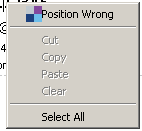
我遇到的问题是,菜单项的图像在Outlook 2010中的位置异常。在Outlook 2007中,其位置不同。似乎菜单项在Outlook 2010中保持了选中图像的位置。
1 2 3 4 5 6 7 8 9 10 11 12 13 14 15 16 17 18 19 20 21 22 23 24 25 26 | Dim bmp As Drawing.Bitmap = My.Resources.olContextMenuIcon bmp.MakeTransparent(bmp.GetPixel(10, 10)) hbitmap = bmp.GetHbitmap Dim mii As New NativeMethodsEX.MENUITEMINFO With mii .cbSize = Marshal.SizeOf(mii) .fMask = NativeMethodsEX.MIIM.MIIM_BITMAP Or NativeMethodsEX.MIIM.MIIM_STRING Or NativeMethodsEX.MIIM.MIIM_FTYPE Or NativeMethodsEX.MIIM.MIIM_STATE Or NativeMethodsEX.MIIM.MIIM_ID .wID = WM_APP .fType = NativeMethodsEX.MFT.MFT_STRING .dwTypeData = String.Concat("Wrong Position") .fState = NativeMethodsEX.MFS.MFS_ENABLED .hbmpItem = hbitmap End With If ShowTop Then NativeMethodsEX.InsertMenuItem(aHwnd, 0, True, mii) NativeMethodsEX.InsertMenu(aHwnd, 1, NativeMethodsEX.MFT.MFT_BYPOSITION Or NativeMethodsEX.MFT.MFT_SEPARATOR, Nothing, Nothing) Else Dim menuItemCount As Integer = NativeMethodsEX.GetMenuItemCount(aHwnd) NativeMethodsEX.InsertMenu(aHwnd, menuItemCount, NativeMethodsEX.MFT.MFT_BYPOSITION Or NativeMethodsEX.MFT.MFT_SEPARATOR, Nothing, Nothing) NativeMethodsEX.InsertMenuItem(aHwnd, menuItemCount + 1, True, mii) End If NativeMethodsEX.DrawMenuBar(subjectRegionHwnd) |
那么我如何告诉菜单项不要为选中/取消选中图像保留空间?
对于这个问题,我有两个答案。
我在上面指出,此问题存在于Outlook 2010的菜单中,但不存在于Outlook2007。这不是事实。这些Office版本当然在不同的计算机上,并且是Windows中的显示设置是造成此问题的原因。当关闭"性能选项">"视觉效果"(Win 7)中的设置"使用Windows上的视觉样式和按钮"时,将获得上面的菜单。如果启用此设置,则菜单的外观尤其会表现出很大的不同。
但是如果用户禁用此设置怎么办呢(不确定与Win10是否相关)。
您需要通过使用Menuinfo来设置菜单样式,尤其是需要设置标志MNS_NOCHECK。然后该空间消失了,因为菜单不再需要复选标记。
此解决方案也可以在另一个stackoverflow答案中看到。