Why does the BuildConfig class use Boolean.parseBoolean() instead of literal values?
当查看由Android Studio和Gradle插件生成的BuildConfig类时,可以看到BuildConfig.DEBUG字段是使用Boolean.parseBoolean(String)调用而不是使用布尔文字true或false之一初始化的。
当我使用Gradle添加自定义构建属性时,我会像这样简单地做到这一点:
1
2
3
| android {
buildTypes.debug.buildConfigField 'boolean', 'SOME_SETTING', 'true'
} |
但是查看生成的BuildConfig告诉我Google使用DEBUG标志采取了另一种方法:
1
2
3
4
5
6
7
8
| public final class BuildConfig {
public static final boolean DEBUG = Boolean.parseBoolean("true");
// more fields here
// Fields from build type: debug
public static final boolean SOME_SETTING = true;
} |
使用Boolean.parseBoolean(String)代替文字有什么好处?
-
您问了这个问题,并在第二秒回答了它? 成就已解锁。 领取您的超人徽章。
-
blog.stackoverflow.com/2011/07/
-
提出问题时,有一个复选框。 我只是想与社区分享我的经验;-)
-
感谢您提供的信息,以前没有看过该博客文章。 但是我想您的问题本质上不是问题,它更适合作为博客文章。
在代码中使用它们时,BuildConfig类中的布尔文字将产生IDE警告(至少在Android Studio中)。例如,在布尔表达式中使用它时,Android Studio将(错误地)建议简化布尔表达式,因为常量值始终是相同的(对于当前的构建变量而言)。
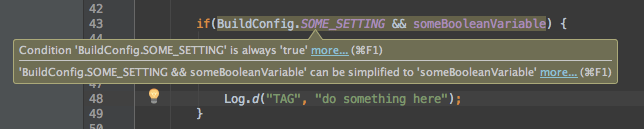
该警告仅是因为Android Studio不知道BuildConfig.SOME_SETTING中的最终值对于其他构建版本可能有所不同。
为了保持代码的清洁和免于警告,您可以通过添加如下的IDE注释来告知Android Studio忽略此特定警告:

但这又会给代码增加一些噪音并降低可读性。通过使用Boolean.parseBoolean(String)方法初始化常量字段,您实际上在欺骗Android Studio,它将不再能够完全分析您的布尔表达式,因此不再产生警告。

这种方法非常有用,因为它可以使您的代码保持干净和可读性,而无需关闭重要的代码分析和警告生成。
-
也许我错过了一些东西,但是到底是什么添加到build.gradle中以使用parseBoolean声明BuildConfig值?
-
@Tunga尝试在defaultConfig或任何风味或构建类型配置中跟随buildConfigField boolean, SOME_FLAG, Boolean.parseBoolean("false")。
-
嗯,谢谢,我可能错过了外面的引号。 我最终使用清单替换来解决我的问题。
-
@ david.schreiber感谢Boolean.parseBoolean技巧!

