draw contour with cv2.threshold() function
我正在用不同的值测试cv2.threshold()函数,但每次都得到意外的结果。 因此,这意味着我根本不了解参数的作用:
- 最大值
有人可以让我明白吗?
例如,我要按照白色绘制该星星的轮廓:

这是我得到的:

从此代码:
1 2 3 4 5 6 7 8 9 10 11 12 13 14 15 | import cv2 im=cv2.imread('image.jpg') # read picture imgray=cv2.cvtColor(im,cv2.COLOR_BGR2GRAY) # BGR to grayscale ret,thresh=cv2.threshold(imgray,200,255,cv2.THRESH_BINARY_INV) countours,hierarchy=cv2.findContours(thresh,cv2.RETR_TREE,cv2.CHAIN_APPROX_SIMPLE) cv2.drawContours(im,countours,-1,(0,255,0),3) cv2.imshow("Contour",im) cv2.waitKey(0) cv2.destroyAllWindows() |
每次更改
先感谢您。
您可能想尝试一个非常简单的图像,使您清楚地了解各种参数。关于下面附加的图像,有趣的是,图像中显示的数字的灰度值等于该数字。例如。 200用灰度值200编写。这是您可以使用的python示例代码。
1 2 3 4 5 6 7 8 9 10 11 12 13 14 15 16 17 18 19 20 | import cv2 # Read image src = cv2.imread("threshold.png", cv2.CV_LOAD_IMAGE_GRAYSCALE) # Set threshold and maxValue thresh = 127 maxValue = 255 # Basic threshold example th, dst = cv2.threshold(src, thresh, maxValue, cv2.THRESH_BINARY); # Find Contours countours,hierarchy=cv2.findContours(dst,cv2.RETR_TREE,cv2.CHAIN_APPROX_SIMPLE) # Draw Contour cv2.drawContours(dst,countours,-1,(255,255,255),3) cv2.imshow("Contour",dst) cv2.waitKey(0) |
我从最近写的《 OpenCV阈值教程》中复制了以下图像。它通过示例图像,Python和C ++代码解释了各种参数。希望这可以帮助。
输入图像

结果图像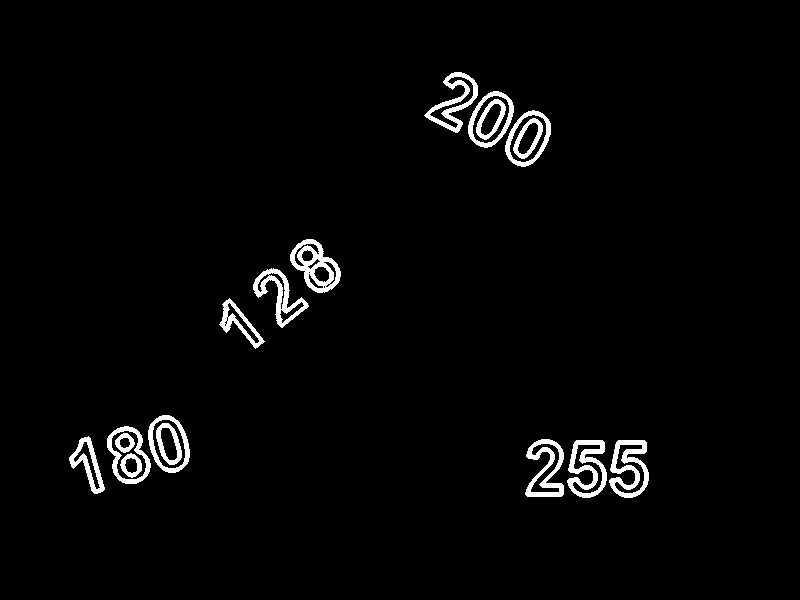
好在这里,您可以使用COLOR_BGR2HSV,然后选择一种颜色,轮廓的制作将非常容易,请尝试并告诉我
在黑色和转换时,您具有相同的黄色和白色,这就是为什么它不起作用的原因
为了更好地找到轮廓,可以在图像上应用阈值,因为二进制图像倾向于提供更高的精度,然后使用轮廓方法。希望这会有所帮助.. !!!